|
Revenue Analyses:
Income Tax Analyses:
Numbers — Charts:
| Tweet | | Contact | Follow @chrischantrill |

What is the Federal Government Revenue?
In FY 2025, federal government revenue was $5.24 trillion according to the Office of Management and Budget. Budgeted revenue for FY 2026 is $5.48 trillion.
Federal Revenue Analysis
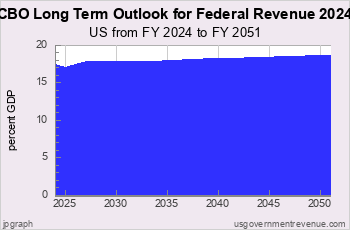
This page shows the current trends in US Federal revenue. There are also charts on US Federal revenue history.
Recent US Federal Revenue


Revenue Analyses:
Income Tax Analyses:
Numbers — Charts:


Suggested Video: Taxes 101
Top Revenue Requests:
Find DEFICIT stats and history.
US BUDGET overview and pie chart.
Find NATIONAL DEBT today.
DOWNLOAD revenue data.
See FEDERAL BUDGET breakdown and estimated vs. actual.
Check INCOME TAX details and history.
See BAR CHARTS of revenue.
Check STATE revenue: CA NY TX FL and compare.
See REVENUE ANALYSIS briefing.
See REVENUE HISTORY briefing.
Take a COURSE at Taxes 101.
Make your own CUSTOM CHART.
Revenue Data Sources
Revenue data is from official government sources.
- Federal revenue data since 1962 comes from the president’s budget.
- All other revenue data comes from the US Census Bureau.
Gross Domestic Product data comes from US Bureau of Economic Analysis and measuringworth.com.
Detailed table of revenue data sources here.
Federal revenue data begins in 1792.
State and local revenue data begins in 1820.
State and local revenue data for individual states begins in 1957.


Site Search
Spending 101
Take a course in government spending:
Spending |
Federal Debt |
Revenue
Defense |
Welfare |
Healthcare |
Education
Debt History |
Entitlements |
Deficits
State Spending |
State Taxes |
State Debt
It’s free!
Win Cash for Bugs
File a valid bug report and get a $5 Amazon Gift Certificate.
Get the Books
 Price: $0.99 Or download for free. |
 From usgovernment spending.com Price: $1.99 |
 Life after liberalism Price: $0.99 Or download for free. |
Data Sources for 2014_2031:
Sources for 2014:
GDP, GO: GDP, GO Sources
Federal: Fed. Budget: Hist. Tables 3.2, 5.1, 7.1
State and Local: State and Local Gov. Finances
Sources for 2031:
GDP, GO: GDP, GO Sources
Federal: Fed. Budget: Hist. Tables 3.2, 5.1, 7.1
State and Local: State and Local Gov. Finances
'Guesstimated' by projecting the latest change in reported spending forward to future years
> data sources for other years
> data update schedule.
Blog
State and Local Finances for 2024
On August 7, 2026 we updated the state and local spending and revenue for FY 2024 using the new Census Bureau State and Local Government Finances summaries for FY 2024 released in July 2026. (See also Annual Survey of State and Local Government Finances). The release includes state and local spending for the United States as a whole and the 50 individual states and the District of Columbia.
State and local spending and revenue for FY2024 are now actual historical spending as reported by the Census Bureau.
We have updated the "guesstimated" state and local finances for FY2025-31 as indicated in our "guesstimate" blog entries.
We have also updated data for individual local government units with data for 2024.
Beginning in 2022 the Census Bureau has changed the value for Line 56 Direct Expenditure and Line 7 General Revenue from own sources, as follows:
We have decided to end our publication of non-insurance trust cash and security holdings.
However, to keep the time series at usgovernmentspending.com consistent, we have decided to add insurance-trust values back into Line 56 and Line 7 values.
On July 2, 2026 we updated the state and local spending and revenue for FY 2024 using the new Census Bureau S ...
On June 16, 2026, the Center for Medicare Services released its annual ...
> blog